Introduction
Android 17 Beta 1 has officially launched, bringing a number of new features and changes.
We’ve provided more information about what’s new, which devices are eligible, and what benefits you’ll get from this update.
So, let’s first talk about eligible devices. This beta version is currently only available for Google Pixel devices, from the Pixel 6 to the latest Pixel 10 series, which includes the Pixel 5 and Pixel tablets. Pixel 5 and older models are not eligible.
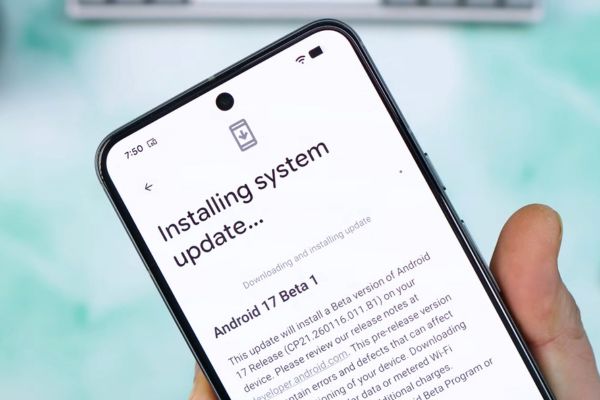
If we talk about installation, installing it is very easy. If you’ve already joined the beta program, the update will automatically appear in Settings, System, and System Updates. If you’re new, you’ll need to opt in on your device by visiting GoogleAndroid.com/beta. Just keep in mind that the beta build may contain some bugs, so back up your data before updating.
- Google is rolling out a new system update for Android 17. Right now, it’s called Cinnamon Bun.
- It also includes the Android security update from January 5th. And for the Google Play System update, we’re getting a gift for April 1, 2026.
- It is coming on February 13th, so you might be wondering when platform stability, or at least finality, will arrive.
Table of Contents
Key Feature of Android 17
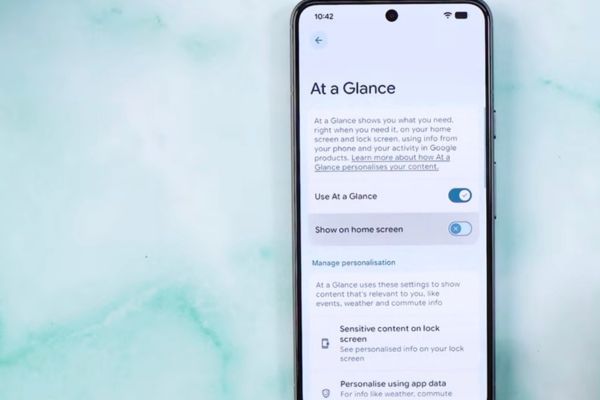
- Android 17 introduces a new toggle in Home Settings to enable or disable the “At a Glance” widget on the home screen.
- Previously, the “At a Glance” feature could only be turned on or off globally; now users can specifically control its visibility on the home screen.
- Keeping the user in mind, Android Beta 1 has focused on better control, customization, and visual feedback for the user.
- New tools and options are coming in Android Beta 1 that give more control to the user, like home screen widget content visibility.
In Android 16, the native Google search bar widget at the bottom of the home screen was fixed and non-customizable; users could not remove or modify it.
Android 17 allows users to customize the appearance of this native search bar widget, although it still cannot be removed.
Customization options in Android 17 include:
- Changing colors, saturation, transparency
- Selecting light, dark, or system-matched themes
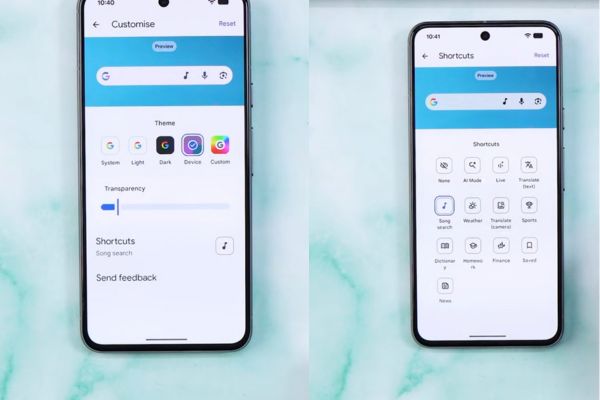
- Adding shortcut icons on the right side of the widget
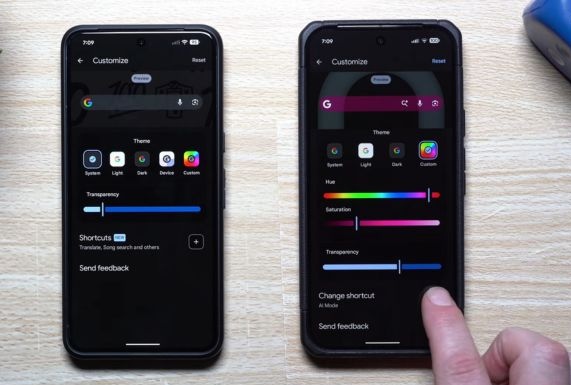
Following the Shortcut icon option added in Android 17:
- AI mode, Live, Translate, Song Search, Weather, Dictionary, Finance, News, Sports, or none
- Tapping these icons opens the respective Google service directly.
- This change aligns the native search bar widget behavior with that of normal widgets, offering greater personalization.
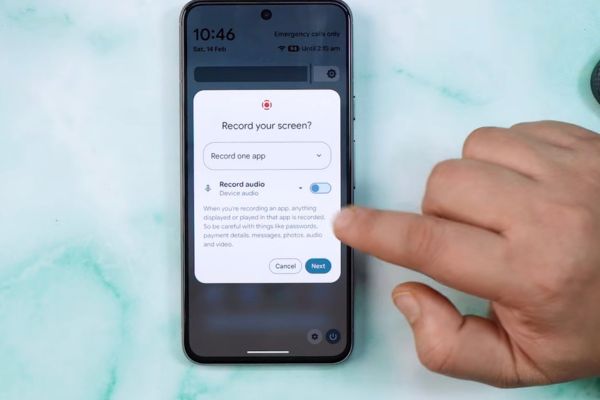
Screen Recording
- The screen recording feature now shows the exact current time, including seconds, during recording.
- This Android helps users track their recordings with the right timing and accuracy.
What changes in Android 17?
- There’s a small change to the volume control interface that’s worth noting.
- The volume rocker in Android 16 used to display a 3-dot icon that wasn’t clear, but
- In Android 17, it’s been simplified and expanded to reveal more options.
- It enhances the display settings by showing a clearer representation of the screen resolution mode.
Watch this video
Summary and Outlook
summarizes the seven main changes presented in Android 17 Beta 1:
- At a Glance toggle on home screen
- Customizable Google search bar widget
- accurate screen recording timer with seconds and current time
- Updated volume rocker icon
- Animated gesture opening for Gemini
- Display resolution visualization with max resolution option
- Expanded parental controls, including Google Play Store filters
- Additional smaller tweaks exist but are subtle and not highlighted.
- Platform stability and additional awaited features are expected in Beta 2 or Beta 3.
- The final Android 17 release is projected for June.